

How to Export Settlements from Afterpay (2026 Guide)
Follow these steps to export your Afterpay settlements as a CSV file. Once exported, you can use any of our converter tools to transform the data for your target system.
Export Steps
Log in to the Afterpay Business Hub
Open your browser and navigate to the Afterpay Business Hub (also known as the Afterpay Merchant Portal). Sign in using your merchant account credentials. The Business Hub is the central dashboard for managing your Afterpay merchant account, viewing orders, and downloading reports.
Navigate to the Settlements section
In the Business Hub navigation, find and click on the 'Settlements' section. This area shows your payout history and provides access to reconciliation reports that detail how each settlement amount was calculated.
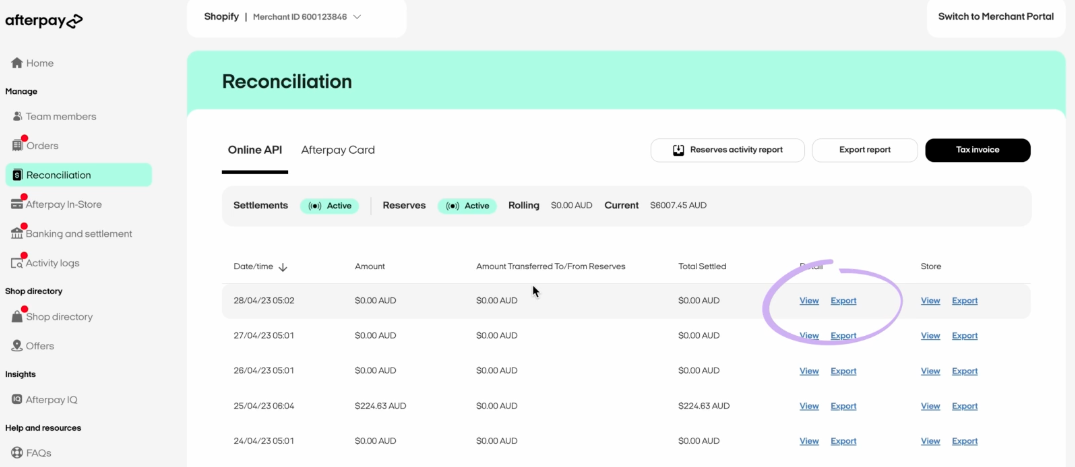
Select the Reconciliation Report
Within the Settlements section, look for the 'Reconciliation Report' option or an 'Export' button. This report provides order-level detail for each settlement, including the original order amount, Afterpay merchant fees, fee tax, and net settlement amount paid to your bank.
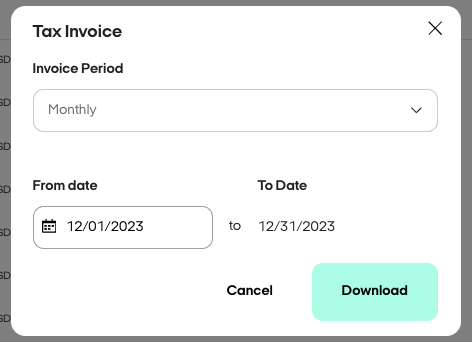
Choose the report type and date range
Select the type of reconciliation data you want (e.g., all settlements, specific payout period). Set the date range to cover the period you need. Afterpay settlements typically occur on a rolling basis, so choose dates that align with your accounting period.

Download the CSV file
Click the 'Export' or 'Download' button to generate the CSV file. The download includes fields such as Order ID, Merchant Reference, Order Date, Settlement Date, Type, Order Amount, Merchant Fee (excluding and including tax), Net Settlement Amount, Currency, Store, and Channel.
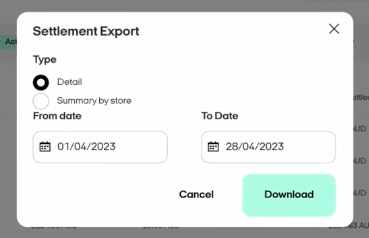
Verify the settlement calculations
Open the CSV in a spreadsheet and verify the fee math: Net Settlement Amount should equal Order Amount minus Merchant Fee incl Tax. Check that the Settlement Date values match your bank deposits. Review any refund rows (Type = 'Refund') to ensure they are properly accounted for.

Required Settlements Fields
| Field | Type | Description | Example |
|---|---|---|---|
| Order ID | Text | Afterpay order identifier | AP-12345678 |
| Order Date and Time | Date/Time | When order was placed (format varies by region) | 15/01/2025 10:30 |
| Settlement Date | Date | When funds settled to merchant account | 17/01/2025 |
| Order Amount | Currency | Total order amount (gross) | 150.00 |
| Net Settlement Amount | Currency | Net payout to merchant (Order Amount - Fees) | 145.60 |
Your Afterpay export must include these fields for successful conversion.
