

How to Export Reconciliation from Worldpay (2026 Guide)
Follow these steps to export your Worldpay reconciliation as a CSV file. Once exported, you can use any of our converter tools to transform the data for your target system.
Export Steps
Log in to the Worldpay iQ Portal
Open your browser and sign in to the Worldpay iQ Reporting and Analytics portal with your merchant credentials. Ensure you have access to the financial reporting section of the portal.
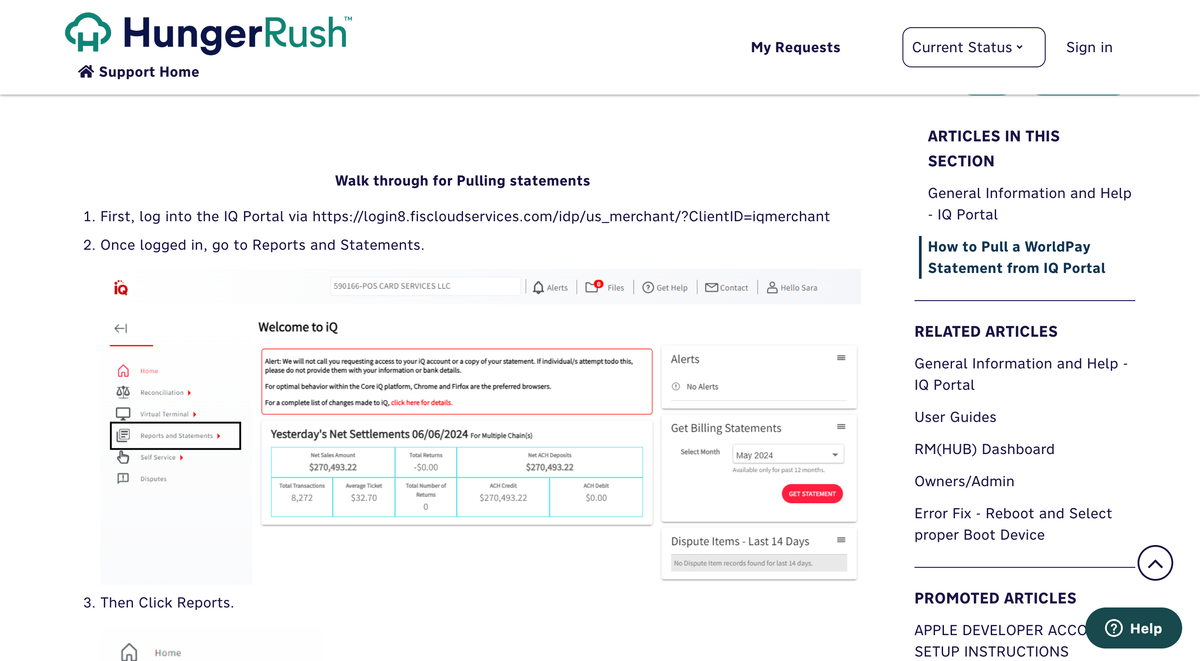
Navigate to the Reconciliation Dashboard
From the iQ Bar, click the Financial icon and select the Reconciliation Dashboard. This report provides a detailed breakdown of each transaction's fees, including Worldpay's commission and passthrough fees (interchange and card network fees).
Set the date range and filters
Select the date range, reporting group, and currency for the reconciliation data you want to export. Click 'View' to generate the report. The reconciliation report links each transaction to its corresponding transfer (payout) batch via the Transfer ID.

Review the fee breakdown
The reconciliation report shows separate columns for Worldpay Fees (Worldpay's processing commission) and Passthrough Fees (interchange and card network charges). Review these columns to understand the total cost per transaction. The sum of both fee types equals the total Fees column.
Export the report to CSV
Click the CSV Export button to download the reconciliation data. The export includes Payment ID, Merchant Order ID, Transaction Date, Settlement Date, Activity Type, Gross Amount, Net Settled Amount, Fees, Worldpay Fees, Passthrough Fees, and Transfer ID.
Verify the data for journal entries
Open the CSV file in a spreadsheet and confirm that the fee breakdown columns are populated. For journal entry creation, you will typically need the Gross Amount (debit to accounts receivable), Fees (credit to expense), and Net Settled Amount (debit to bank). The Activity Type column distinguishes deposits, refunds, chargebacks, and adjustments.

Required Reconciliation Fields
| Field | Type | Description | Example |
|---|---|---|---|
| Payment ID | Text | Unique transaction identifier | PAY-1234567890 |
| Transaction Date | Date | Transaction processing date | 2025-01-15 |
| Settlement Date | Date | Settlement date | 2025-01-17 |
| Gross Amount | Currency | Amount before fees | 125.00 |
| Net Settled Amount | Currency | Net after all fees | 121.50 |
Your Worldpay export must include these fields for successful conversion.
