

How to Export Customers from Shopify (2026 Guide)
Follow these steps to export your Shopify customers as a CSV file. Once exported, you can use any of our converter tools to transform the data for your target system.
Export Steps
Log in to your Shopify admin
Open your browser and go to your-store.myshopify.com/admin. Sign in with your credentials. You need at least the Customers permission on your staff account to access the customer list and export functionality.
Navigate to the Customers page
From the left-hand sidebar, click on Customers. This opens a list of all customer profiles in your store, including those who have placed orders and those who have created accounts. The Export button is located in the upper-right area of the page.
Select specific customers (optional)
If you only need to export certain customers, use the checkboxes next to each customer name to select them individually. You can also use the search bar and segment filters to find customers by tags, location, spending amount, or order count. If you want all customers, skip this step.

Click Export and choose the export scope
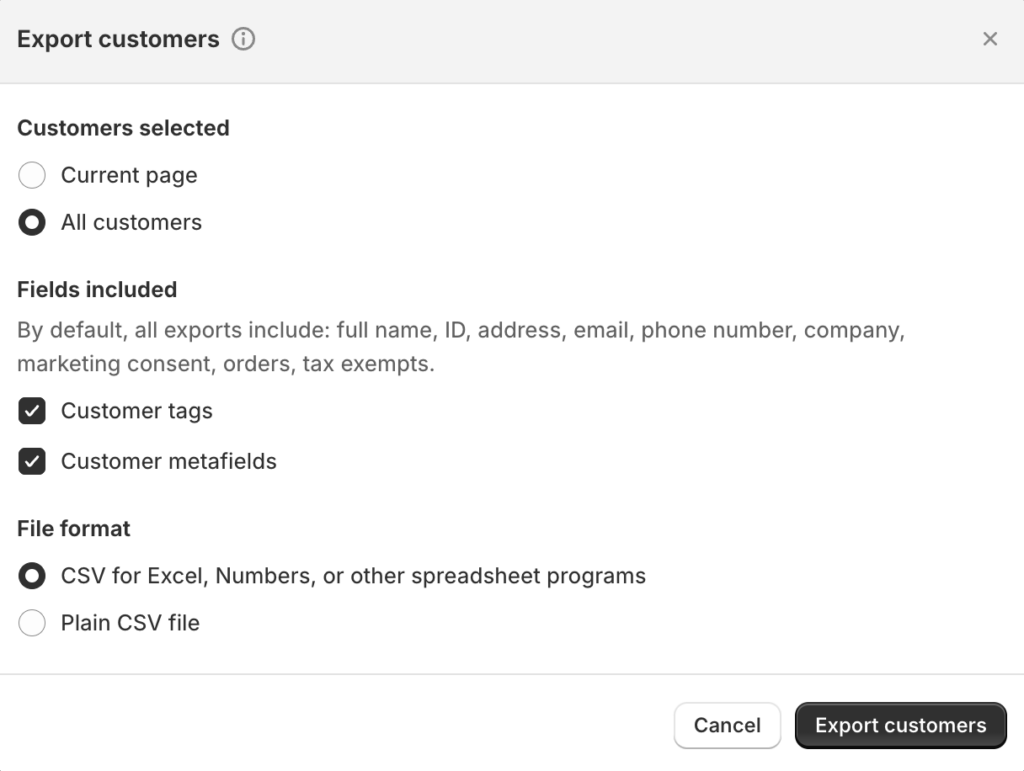
Click the Export button to open the export dialog. You will see options to export the current page of customers, all customers matching your search or filter, selected customers only, or all customers in your store. Choose the scope that matches your needs.
Select additional fields and CSV format
In the export dialog, you can choose to include Customer tags and Customer metafields in the export file alongside the default fields. Under the format section, select 'CSV for Excel, Numbers, or other spreadsheet programs' for the best spreadsheet compatibility. Click 'Export customers' to begin the download.
Download or check your email
If the export contains 50 or fewer customers, the CSV file downloads directly to your browser. For larger exports, Shopify processes the file in the background and emails a download link to the store owner's email address. The exported CSV file is limited to 15 MB in size.
Review the exported data
Open the CSV in a spreadsheet application. Each row represents one customer profile. The file includes standard fields like First Name, Last Name, Email, Phone, and default address details. The 'Total Spent' and 'Total Orders' columns are read-only summary fields calculated by Shopify and cannot be imported back.
Required Customers Fields
| Field | Type | Description | Example |
|---|---|---|---|
| Text | Customer email address (required column) | john.doe@example.com |
Your Shopify export must include these fields for successful conversion.
